Enchanting in Minecraft adds that extra edge to your gameplay. Whether you’re mining, building, or battling mobs, enchantments can improve your tools, armor, and weapons. This Minecraft Enchanting Table Guide is designed specifically for beginners who want to understand how enchantments work, what are they and how to use them.

What Is an Enchanting Table?
The Enchanting Table is your gateway to giving ordinary items some serious upgrades. It lets you add magical effects called enchantments to your gear, like making your tools last longer or giving your sword a bit of punch. Once you start using it, you’ll wonder how you ever played Minecraft without it.
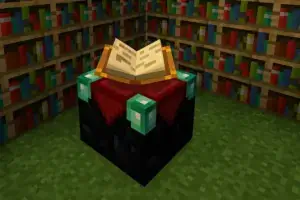
How to Craft an Enchanting Table
To make an Enchanting Table, you’ll need:
- 1 Book
- 2 Diamonds
- 4 Obsidian
Place them on a crafting table like this:
- Bottom row: 3 Obsidian
- Middle row: Obsidian in the center, Diamonds on each side
- Top row: Book in the center
Crafting the Enchanting Table is just the start. For better enchantments, you’ll need to build the right setup around it.
Setting Up Your Enchanting Station
To unlock higher level enchantments, you need to surround your Enchanting Table with Bookshelves:
- Place 15 Bookshelves one block away from the table (not directly touching it)
- Leave a one block gap between the bookshelves and the table
- Make sure there’s nothing blocking the path between the table and the shelves (like torches or other blocks)
This setup allows enchantments up to level 30 (which is the highest).
How to Use the Enchanting Table
Once your table is set up:
- Right-click the Enchanting Table to open the interface.
- Place the item you want to enchant in the left slot.
- Insert Lapis Lazuli in the right slot. You’ll need 1 to 3 pieces depending on the enchantment level.
- Choose one of the three available enchantments.
Note: The enchantments offered are semi-random, but they depend on your experience level and the number of bookshelves.
Step by Step Guide:
- Set up Enchanting Table
Make sure it’s surrounded by up to 15 bookshelves (one block away) for maximum-level enchantments.
- Gather Lapis Lazuli and XP
You’ll need:
- Lapis Lazuli (1–3 pieces per enchant)
- Experience levels (from 1 to 30, depending on enchantment strength)
- Open the Enchanting Table
Right-click the Enchanting Table to access the interface.
- Insert your item
Put your gear (e.g., sword, pickaxe, helmet) in the left slot.
- Add Lapis Lazuli
Place 1–3 pieces in the right slot (the table shows how many are needed for each option).
- Choose an enchantment
You’ll see three options. Hover over each one to see a hint of the enchantment offered (some info is hidden unless you use commands or external tools).
- Click to apply
Pick the enchantment you want. It consumes XP and Lapis, and applies the enchant to your item.
What Items Can Be Enchanted?
Here’s a list of item types you can enchant directly with the Enchanting Table:
- Weapons: Swords, Bows, Crossbows, Tridents
- Tools: Pickaxes, Axes, Shovels, Hoes
- Armor: Helmets, Chestplates, Leggings, Boots
- Books: Useful for storing enchantments and applying them with an anvil later
- Fishing Rods and Shears (with some limits)
Best Enchantments for Beginners
If you’re just starting out, here are some of the most useful enchantments to look for:
- Efficiency: Speeds up mining or chopping
- Unbreaking: Makes your tool last longer
- Fortune: Increases the drop rate of valuable resources
For Weapons:
- Sharpness: Boosts overall melee damage
- Power (for bows): Increases arrow damage
- Looting: Helps mobs drop more and better loot
For Armor:
- Protection: Reduces most types of damage
- Feather Falling (for boots): Reduces fall damage
- Respiration (for helmets): Increases underwater breathing time
Tips and Tricks
- Always bring extra Lapis Lazuli when you plan a long enchanting session.
- Use grindstones to remove unwanted enchantments and try again.
- Combine enchanted books using an anvil to stack multiple effects.
- Keep an XP farm or mob grinder nearby to level up faster.
- Enchant books first if you want more control over what goes on your gear.
How Eldorado.gg Can Help with Enchanting
If you’re looking to get the most out of your enchanting setup without grinding for hours, Eldorado.gg can make things easier:
- Buy Minecoins: Use them to access resource packs, XP boosters, or content that can help you level up faster and get to enchanting quicker.
- Get Items Directly: Skip the hassle and buy high-quality or rare items, including enchanted gear, so you can focus on gameplay.
- Purchase Ready Accounts: Jump into a world where you already have the levels and resources to enchant gear right away.
- Hypixel Coins: If you’re on Hypixel servers, coins can help you acquire gear where enchantments give a real competitive edge.
Minecraft Enchanting Table Guide Recap
This Minecraft Enchanting Table Guide should give you a great head start on boosting your gear with a bit of magic. Once you’ve got your setup ready and some XP to spare, even your simplest tools can become total game-changers. Enchantments can make mining quicker, battles safer, and adventures more exciting overall.
So whether you’re diving into your first cave or gearing up for the Ender Dragon, enchantments can really tip the odds in your favor. Now that you’ve got the basics down, fire up that table and have fun discovering what kind of awesome gear you can create!


 Minecraft